
NetMine is worked out to control all the Internet and network activity. This firewall software monitors the incoming and outgoing network and Internet traffic, providing protection against unwanted access to and from your computer providing powerful protection against malicious viruses, worms, bots, and rootkits. ProteMac NetMine allows you to set up automatic rules for all programs or set the criteria for permission or deny access to definite applications. Even when you are out this program tracing of all information that comes to your computer from outside. determine prevents intrusions warning you about any threats at the point of entry. Get reliable protection of your computer from any unwanted access with NetMine!
 Protects against viruses, spyware, Trojan horses, worms, bots, and rootkits Stops threats at point of entry with a quiet two-way firewall Blocks browser, OS, and application threats; protects against infected Web sites Helps secure and monitor your home network Intercept unwanted network connection attempts Detailed information of all incoming and outgoing network traffic. Two-way firewall Network Monitor for visualizing network activity in real-time Controls incoming and outgoing TCP/IP traffic and data Internet Worm Protection Intrusion Prevention Individualized security policies for antivandal attacks Simple and advanced firewall modes
Mac OS X Features
Protects against viruses, spyware, Trojan horses, worms, bots, and rootkits
determine filters every computer application detecting if it contains malicious influence to configure whether to approve it for its toward destination or not. Even when you are out this firewall is on the watch examining information from outside that comes to your computer through “firewall gates”.
Stops threats at point of entry with a quiet two-way firewall
NetMine implements definite security rules in network traffic establishing access criteria to private and corporate networks. Using our two-way firewall any attempts of inappropriate access onto your computer will be blocked immediately.
Blocks browser, OS, and application threats; protects against infected Web sites
Such two-way firewall as NetMine has become an essential component both for corporate computer network and for private one. This powerful appliance is designed to protect your home network and family against infected Web sites, application threats and potential hackers.
Helps secure and monitor your home network
NetMine Helps secure and monitor your home network from illegal transmission tracing all Internet and network activities performed on computer. It prevents computer tampering and disclosure of personal data excluding the possibility of intrusion of hidden malwares and exposing to the malicious influence they contain.
Intercept unwanted network connection attempts
Internet connection presupposes access to your private database from the outside. With ProteMac NetMine you set the criteria to permit or deny the access of definite applications to your private data or to block any connections from untrusted applications.
Detailed information of all incoming and outgoing network traffic.
ProteMac NetMine is a two-way firewall for your Mac that allows establishing control over incoming and outgoing information flows managing network traffic. This firewall delivers best protection to activate security against computer viruses, identity threats, and blocking access to personal data from outsiders.
Two-way firewall
Designed as a two-way firewall, NetMine establishes control over incoming and outgoing information flows managing network traffic. Working undetectable, this software provides a powerful line of defense protecting your Mac from outside attacks and from software on your computer.
Network Monitor for visualizing network activity in real-time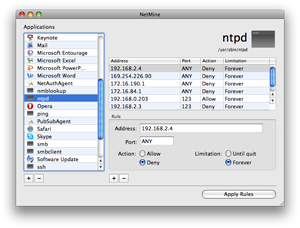
NetMine presents a unique and at the same time beautifully simple program is designed to control and monitor all the Internet and network activity on your computer Visualizing network activity in real time, NetMine prevents unauthorized leak of information to guard your private data and block connections from untrusted applications.
Controls incoming and outgoing TCP/IP traffic and data
ProteMac NetMine controls incoming and outgoing TCP/IP traffic and data. This reliable firewall enables you to grant or deny permission to access the Internet for the selected application. The special Notification window warns you about unknown connection offering to allow or deny it once, till the end of Internet/network connection or forever.
ProteMac NetMine constructs invisible barrier between unauthorized Internet users and private networks. Internet abounds in Viruses, spam and malwares that distract our workflow on computer. This two-way firewall leaves all security issues aside allowing users to concentrate on their work.
Updated ProteMac NetMine delivers amazing performance and high-quality protection for the most demanding consumers. NetMine presents the best protection against unwanted intrusions preventing them at the point of entry: computer viruses, identity threats and guards resources of private network from outside attacks.
Individualized security policies for antivandal attacks
The great threat for computer users represent hackers that crave for access to our private data. But NetMine empoers you to establish individualized security policies for antivandal attacks. Featuring precise identification of application’s address and port and reliable protection form outside attacks, NetMine easily blocks access to your computer data and prevent leak of information.
Simple and advanced firewall modes
ProteMac NetMine is very easy to use and also very effective. You will not have problems with your Mac using this program.
Protects against viruses, spyware, Trojan horses, worms, bots, and rootkits Stops threats at point of entry with a quiet two-way firewall Blocks browser, OS, and application threats; protects against infected Web sites Helps secure and monitor your home network Intercept unwanted network connection attempts Detailed information of all incoming and outgoing network traffic. Two-way firewall Network Monitor for visualizing network activity in real-time Controls incoming and outgoing TCP/IP traffic and data Internet Worm Protection Intrusion Prevention Individualized security policies for antivandal attacks Simple and advanced firewall modes